Sign In

Don't call them educational toys—at least not in front of the kids! The toys reviewed here—listed by recommended ages, from younger to older—are loaded with cool technology that not only makes them fun but also helps kids learn and encourages creativity. Even better, each costs less than $100. The all-out toys will run more, but they're just too cool for us not to include.
Don't forget the batteries for any of the toys here or other presents you're giving. Our review of AA batteries will tell you which ones to buy. And check our holiday and gift guide for more deals and tips!

Ages 2 and older, $52
https://cloudb.com/twilight-turtle-tunes
Twilight Turtle is part plush toy, part nightlight, and part sound-soother. Through its hard shell, the turtle projects star patterns onto the ceiling of a dark room in three different colors. It comes with a chart so kids can identify the constellations. And you can choose to play a volume-controllable soundtrack of gentle waves.
New this year is Bluetooth connectivity and Cloud B, a free iOS app that lets you mix your own soundtrack from nature sounds and lullabies. There's also a premium version ($1.99) that lets you blend in your own sounds. We like that the Turtle's battery is rechargeable, and customizing sounds can be fun for parents. (The wave soundtrack creates a nice office ambiance, too, though it does tend to make you feel a bit sleepy . . . )
Ages 3 to 7, $50
https://www.fisher-price.com/en_US/brands/imaginext/products/71903
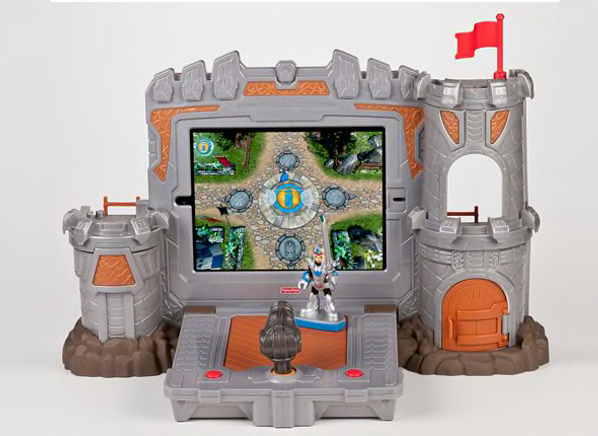
The Fisher-Price Imaginext Apptivity Fortress is a cool combination of a physical toy and video game, along the lines of Activision's Skylanders, but made especially for younger kids. We like that this toy encourages imaginative play. Kids will have fun playing with the castle and knight character alone, but add an iPad and free app to the mix, and they can search for gold, fight ogres, and explore the inside of the castle, too.
The iPad fits into a snug padded case with a tough transparent cover, so you won't have to worry that it'll get dropped or bumped. We'd recommend that parents handle the insertion and removal of the iPad—it could be a bit tricky for small hands.
Start up the app, and place your toy knight right on the screen. He becomes your video-game avatar. The cannon toy can be used as a controller in games. The fortress, which requires three AAA batteries, powers on when you insert the iPad and turns itself off when you remove it.
Ages 5 and older, $20
https://popartoys.com/shop/planets-3d-book
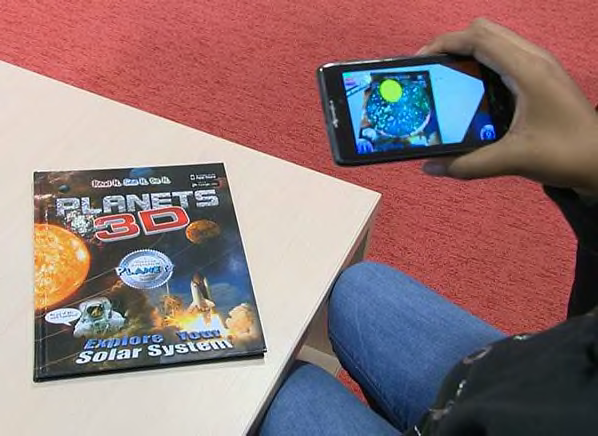
This hardcover book is great on its own. It's a guided tour through our solar system filled with colorful images and fun facts. But here's the exciting and techie part—download a free app from Popar (for PCs, Macs, and iOS and Android mobile devices) and through the magic of augmented reality (AR), the pages come to life when viewed through your device's camera.
You'll see 3D animated and interactive images of planets, rocket ships, probes, and satellites, and hear voiceovers with more info. You can cut out and use included paper "Popar Paddles" that also activate the animations, in case you're without the book. The AR works really well, and it's easy to get it working—that's a lot for $20!
Ages 6 and older, $50
https://mattelbrandsmedia.com
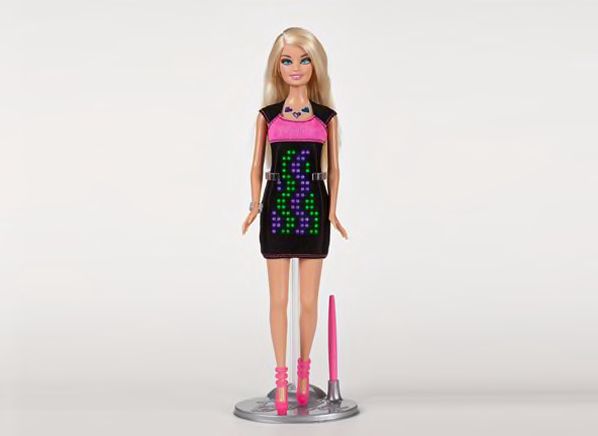
Barbie's now on the cutting edge of fashion and technology, with a little black dress that flashes color LEDs in any pattern or design you can devise. Use the jewels in her necklace to choose your palette and sketch away using the included stylus or just your finger. You can save all your designs or start from scratch with new ones. Her legs are the cases for two AAA batteries (you'll need a tiny Phillips head screwdriver to insert them).
This Barbie isn't very posable, and the pixels on her dress are so large that designs have to be pretty basic. But creative kids will still have a blast with this Barbie. (I like to think this is Computer Engineer Barbie out for a night on the town.)
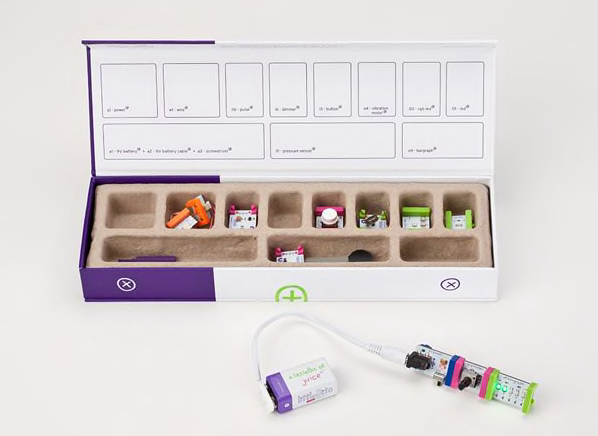
UPDATE: The Starter Kit we reviewed is no longer available from LittleBits; it's been replaced by the Base Kit (Exploration Series), $100. This very similar kit comes with 10 Bits (modules) and an instruction booklet. The recommended age range is 8 and older.
—
The LittleBits Starter Kit is a box full of electronic modules that you can attach to each other to make a working electrical circuit. Sound boring? It's anything but!
This compact kit gives kids everything they need to start making connections right out of the box: a battery ("a little bit of juice"), cable, and power button, and modules with all sorts of functions: a dimmer, LED light, pressure sensor, and more.
The cute, color-coded modules attach magnetically, so you can swap them around and try new combinations easily. The fun doesn't end there, though: at littlebits.com, kids can find an amazing array of projects to build, most contributed by the littleBits community.
Ages 8 and older, $89
https://www.bigshotcamera.com
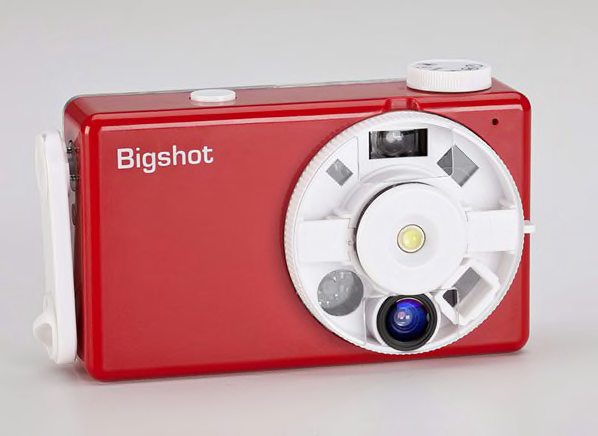
We love "build it yourself" electronics kits, and this one doesn't disappoint. You and your kids can actually put together a real, working digital camera in about an hour.
Before you start the project, make sure you're in a well-lighted space with lots of table room. One grownup who's not afraid of gadgets should be in attendance, since a few steps require steady hands and patience.
The back cover of your finished camera is transparent, so you can see those components you put inside. And the BigShot has several lens modes, including panorama and 3D. The BigShot camera charges via USB but also has a hand crank, so you can charge it for a few extra shots if you run out of juice. At BigShot's website, you'll find explanations of the hardware and lots of useful photography information and instruction.
Ages 8 and older, $40
https://www.smartlabtoys.com/science-lab.html
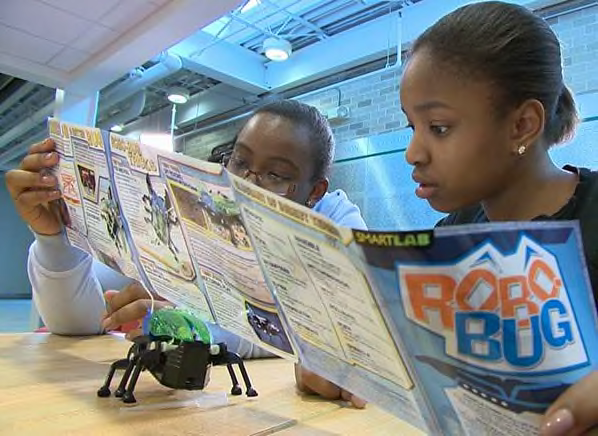
Want to be a mad scientist? How about a meteorologist or a robotics engineer? This lab-in-a-box lets you do all three. It has all the pieces you need to track wind speed, wind direction, and temperature; mix up some invisible ink or glowing slime; and build a robot-like bug.
You get colorful fact sheets and guides for each project. Parents should probably stand by to help when kids are snapping parts together (especially for the robot bug—it's a little fragile). But once everything's built, you can let them loose to play. We love the learning aspects of this kit—science basics included. And there's a lot of satisfaction in building the toys and then seeing them actually work!
These two toys include serious technology. They're also a serious splurge. We didn't try them out ourselves, but I saw them in action at Toy Fair 2013 in New York City.
LEGO MindStorms EV3
Ages 10 and older, $350
https://shop.lego.com
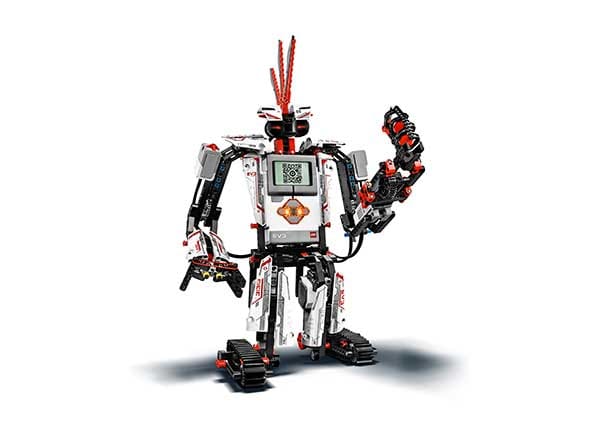
Lego's robot-building concept is around 15 years old, but the company has redesigned MindStorms to be more accessible and to work with other devices. You can build 17 types of robots right out of the box, and control them via your smart phone. And the new building bricks have programming built in, so you don't need to program your robots on your computer.
Puzzlebox Orbit, mobile edition
Ages 14 and older, $190
https://orbit.puzzlebox.info
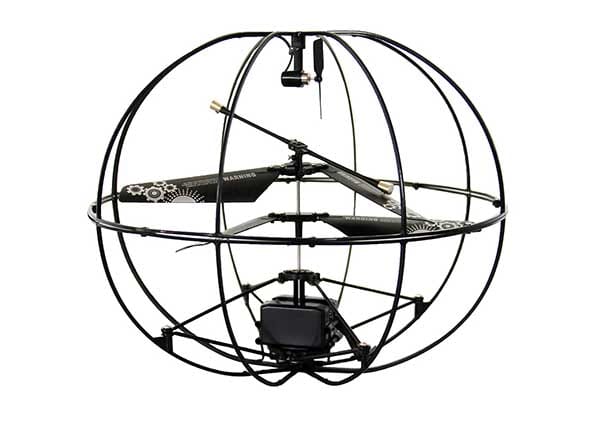
You guide this "brain-controlled helicopter" using a NeuroSky MindWave EEG headset that the maker claims picks up on your level of attention or relaxation. So you'll learn to control those things yourself with the help of visual and physical feedback, and then control the Orbit.
The seven toys below, originally reviewed for the 2012 holiday season, are still available; prices have been updated for this year.
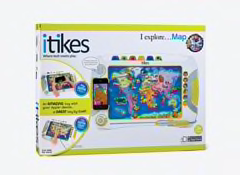
Ages 3 and older
$35, itikes.com
This nifty portable toy is packed with learning opportunities. Use it on its own or along with an iPhone, iPod Touch, or iPad. You can also play with the I Discover Map app on one of those devices without the toy.
To play, you insert one of the included maps into the front slot of the toy. Then use the stylus to click around the map and learn interesting facts as you go. (Did you know that Saturn's rings are made of ice and rocks?) This isn't a new concept, but here it's well implemented and fun to use.
We used an iPhone along with the toy and got some extra animated content—eventually. The 3D images were especially cool. But the app is really slow to start up. And we couldn't get the camera to identify things on the map without touching the screen with the stylus. We would like to see more troubleshooting and help, either in the manual or online. Otherwise, this could get frustrating for parents and kids.
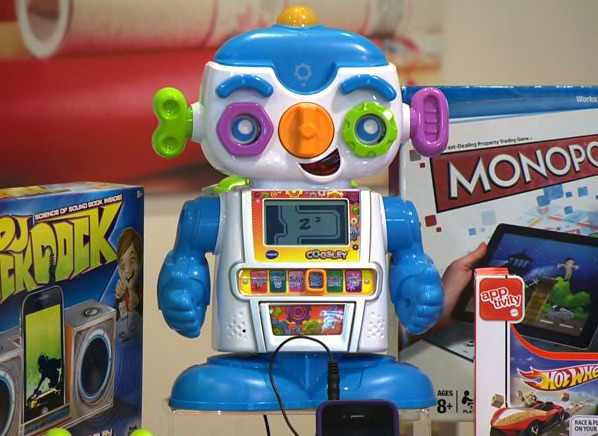
Ages 3 to 6
$40, vtechkids.com
Cogsley is a sturdy little robot that moves, talks, sings, and teaches. He's in the cute zone on the cute-to-creepy robot scale.
Tap Cogsley on the head to wake him up, then select the learning activity you'd like to play. His torso swivels, lights flash, and his eyebrows move up and down. His voice is fun—part nerd and part pitchman.
You can twist his ears, eyes, and nose, and he responds. Or you can drop chips into a slot above his nose to answer questions or learn new info. The chips seem a little losable for the age range, but Cogsley does come with a clip-on backpack to store them.
Cogsley responds to clapping by dancing and singing, but the sound of his movements can drown out the music. And the LCD screen on his torso is a bit tough to see and read; it's not in color, nor is it back-lighted.
Two big pluses for parents: auto shutoff (to conserve batteries) and volume control (to preserve your sanity).

Ages 4 and older
$10, firstactdiscovery.com
This mobile microphone, which comes in five zingy color combos, really works, amplifying voices as kids talk or sing. It also makes three funny sound effects (elephant trumpeting, electronic whistle, and something we can only describe as "whacka-whacka"). We wish there were a few more, because they're really fun!
Even better, you can bend the 3-foot WrapStar to fit around your wrist, wear it on your head, place it on a bike's handlebars—the possibilities are nearly endless. But parents beware: Send your little stars outside with this one, unless you don't mind lots of loud singing, because there's no volume control!
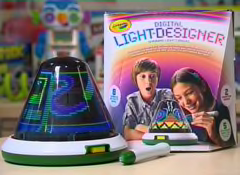
Ages 6 and older
$50, crayolastore.com
When you first take it out of the box, the Crayola Digital Light Designer is a dark plastic dome. But add four D batteries, turn it on, and it transforms: An array of LED lights inside starts spinning and creates colorful designs on the transparent surface of the dome.
Using the included stylus, young artists can draw right on the dome and save up to 50 of their favorite designs. Kids can animate their drawings or play one of the games included.
One bummer: Its motor is pretty loud. That's too bad, because if children want to keep it on in their rooms at night, it might keep them awake. Still, if you can tune out the whirring noise, the toy does seem almost magical.
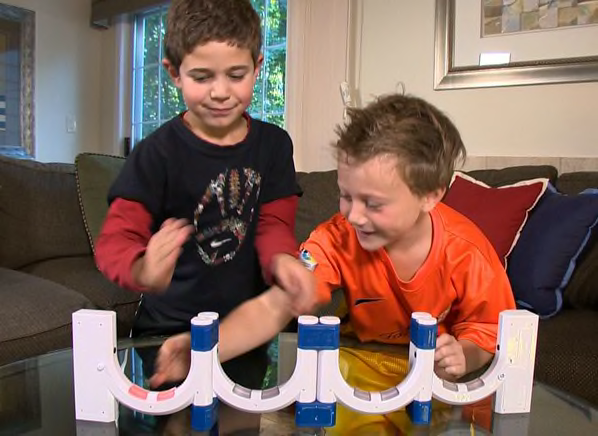
Ages 7 and older
$37, shop.mattel.com
Loopz is an ingenious electronic device with built-in memory and reflex games. You pass your hand into the loops and follow increasingly complex patterns of lights and sounds. This is even better than the previous version, adding a new dimension to the challenge by letting you reconfigure the loops into different shapes.
As you play, the games get harder and harder. It takes practice and concentration to do well, but it's fun, especially with another player. The device remembers high scores and gives feedback, such as "You're a rock star!" And for a techie toy, the Loopz Shifter Game really gets kids moving.
Ages 7 and older
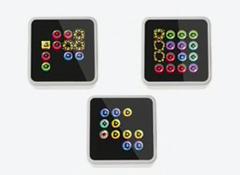
$130 for 3 cubes, sifteo.com
Sifteo Cubes are expensive, but they're among the most innovative toys we've seen. The new ones out now sound even cooler than the originals, which we loved.
Each of the 1.7-inch cubes has a color LCD touch screen, a motion-sensing accelerometer, and embedded sensors that find other cubes. You can play with up to 12 cubes; additional ones cost $30 apiece.
Play one of the four free games, download a fifth for free (additional games are $8 to $12 each), or design your own. Choices include match challenges, puzzles, and word games. You download games to your computer, then hook up to the Sifteo base. We recommend starting with the excellent tutorial.
We love the creativity it took to come up with the concept, the intuitive game play, the learning challenges, and the excellent help and direction the company provides. Sifteo cubes are different from any other toys we've seen and should keep kids entertained for hours.
Ages 8 and older
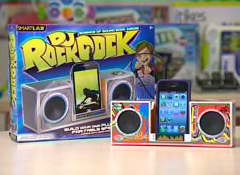
$20, smartlabtoys.com
This SmartLab kit has everything you need (except a 9-volt battery and transparent tape) to create a working stereo speaker dock for an MP3 player or any digital music player with a headphone jack.
Colorful, easy-to-follow instructions explain how the dock works and how to put it together without dumbing things down too much. But unless you have a mini-Edison on your hands, we'd recommend that you help out—it's a perfect project for two people.
Once it's built, the cardboard dock looks cool, and your little engineer will know exactly how it works. You won't get high fidelity, but the audio is perfectly adequate. It sounds even better when your kid says, "I made this myself!"
—Carol Mangis
This article was adapted from ShopSmart magazine.

 Build & Buy Car Buying Service
Save thousands off MSRP with upfront dealer pricing information and a transparent car buying experience.
 Get Ratings on the go and compare
while you shop

