Sign In

Menu
Suggested Searches
Recent Searches
Suggested Searches
Product Ratings
Resources
Chat With AskCR
Resources
All Products A-ZThe payment for your account couldn't be processed or you've canceled your account with us.
Re-activateMy account
Sign In
My account
Sign In
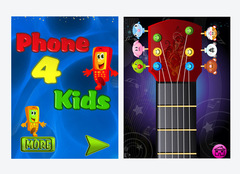
Phone For Kids is not just one app: Inside it are several mini-apps, all aimed at entertaining and educating children. It simulates Apple's iOS mobile operating system, but the graphics are bigger and more kid-centric. It is very clever.
A free version of the app comes with 6 mini-apps inside, and they're very much like the standard apps that come with an iPhone or iPad. For instance, there is a map icon that simulates a compass, an SMS icon that lets kids pretend to send text messages, and a telephone app that lets them push numbers to make a call. These mini-apps don't actually send calls or texts, though, so you can relax knowing that your little one won't run up your phone bill.
If you purchase the full version of Phone for Kids for 99 cents, you get several additional mini-apps that your child can scroll from screen to screen to play. A jewel-like icon takes you to a color game with a woman's voice clearly saying the names of the colors when you touch them. A similar app teaches shapes.
An icon with a zebra on it takes you to a page with 16 cartoon animal images. When you touch the animal, it makes the appropriate noise and spins in a circle. An icon with a pirate on it is my least favorite, though; it is just a treasure map with floating pirate images, like a sword and gold coin.
Some of the included apps allow your child to practice on what looks like the virtual keyboard on iOS devices. When you press the letters, they are spoken aloud. There is a also a simple calculator that can perform addition, subtraction, multiplication, and division.
My son's favorite is the music mini-app. It is nothing more than an image of the neck and head stock of a guitar, but when you strum the strings, music plays and musical notes dance around the screen.
When an app requires voice instructions, such as in the farm-animal game that asks you to identify each animal by name, the voice is that of a nice-sounding British lady. There is no option to change that to an American or man's voice.
This app does not change orientation if you tip your iPad or iPhone on its side, and pushing the Home button will not take you back to the simulated Home screen but will close you out of the app altogether. That can be confusing for kids who actually know to use the Home button. You have to push a virtual Home button within each app to get from one mini-app to another.
Because of this, it would be nice if you could lock the physical Home button from a Settings menu within the app. This would keep your child inside the app for as long as he or she would like to be, without confusion. Alas, there are no settings at all inside this app. It is what it is. But it sure is a bargain to get several fun educational mini-apps inside just one main app.
To find out more about a wide range of products for babies and kids, check out our Buying Advice (free) and Ratings (available to subscribers). And follow us on Facebook and Twitter.
—Natali Morris


 Build & Buy Car Buying Service
Save thousands off MSRP with upfront dealer pricing information and a transparent car buying experience.
 Get Ratings on the go and compare
while you shop


