Sign In

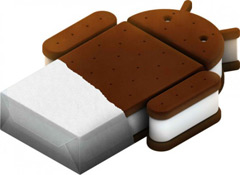
Android 4.0, also known as Ice Cream Sandwich (or ICS), is the long-awaited version of Google's Android operating system that's designed for both smart phones and tablets, allowing software to be easily developed for both types of devices. The first tablet running the new OS is the Asus Eee Pad Transformer Prime. We took a look at the quad-core Transformer with Ice Cream Sandwich to see what new features it brings to the tablet world. The changes aren't earth-shattering, but there are some noticeable improvements.
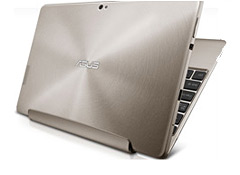
Of course, the changes also impact smart phones. But in some cases, the features on tablets manifest somewhat differently than they do on phones. For example, tablets can take advantage of the extra screen space to display the more-robust camera features of Android 4. And as with other versions of the operating system, you might notice differences from one manufacturer to the next as each tweaks their devices with special features.
Here's a rundown of some of the new things I saw on the Transformer Prime, thanks to ICS.
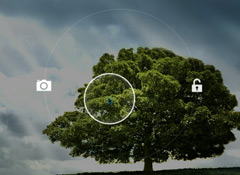
Camera. The first thing you'll see when you turn on the Transformer Prime is the familiar lock icon. But move the lock a bit to the left, and a camera icon shows up in the outer circle, taking you directly from the locked tablet to the camera. Unlike with earlier versions of Android, all the controls for the camera are built into the control wheel. For example, Zoom is a sliding control within the wheel rather than the Plus/Minus set above it in prior versions. There are some new controls, including aspect ratio and ISO. Also new is the panorama camera. (These features are more handy on smart phones, since taking photos with a tablet can be clumsy.)
Widgets. Widgets reside on a separate tab on the apps screen. Asus includes a task manager that lets you shut running apps down with one click, an easy way to save some battery life. Widgets are now resizable, so you can fit more of them on one screen if you wish.
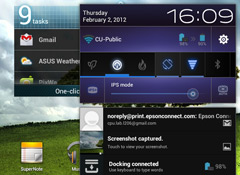
Settings. You get one-click access to more settings controls from the home screen. Touch the bottom right corner of the screen, and a box pops up that includes a number of useful controls, including a set of power-usage choices—Power-saving, Balanced, and Performance modes. There's also a rotate-lock button, Bluetooth and Wi-Fi On/Off, and brightness controls. These require two or more clicks to access in older Android versions.
Settings are now arranged by function: All the wireless and network settings are together, followed by device settings such as Sound, Display, and Battery. Personal settings include Security and Accounts; Date and Time, among others, are found under system settings.
Organizing your apps is easier, because you can now place apps into folders simply by stacking one on top of the other, then naming the folder. But the folders are unattractive, unfortunately, because they look like what they are—a stack of apps sitting on your screen. Once you press the stack, a folder temporarily pops up so you can select the app you want to launch.
Related:
First look review: Samsung Galaxy Nexus is a sweet performer, thanks to Ice Cream Sandwich
—Donna L. Tapellini


 Build & Buy Car Buying Service
Save thousands off MSRP with upfront dealer pricing information and a transparent car buying experience.
 Get Ratings on the go and compare
while you shop


