Sign In

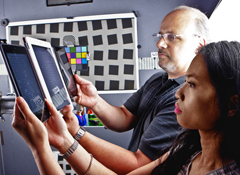
The Amazon Kindle Fire HD may not meet the company's goal of creating "the best tablet at any price," our tests suggest. But it's a fine performer that improves markedly on the first-generation Fire.
We've been testing a press sample of the $199 7-inch Fire HD in advance of its shipping date this Friday. An 8.9-inch version of the device ships on November 20, and a revamped version of the first-generation Kindle Fire ships on October 1.
Here's our take on what is now Amazon's top-of-the-line tablet, including comparisons to Apple's iPad and the Google Nexus 7, both very strong performers in our tablet Ratings.
WHAT WE LIKE
The display. The biggest claim for this second-generation Kindle Fire is an improved screen. And that claim holds up in our tests.
In particular, glare is reduced over the HD's predecessor, creating a screen that's among the easiest to read in bright light among tablets we've tested. Color fidelity is also a step up on the old Fire, though it's still a little behind the third-generation iPad screen, which has the highest color accuracy we've measured on a tablet. Viewing angle is very wide, on a par with the best 7-inch tablets.
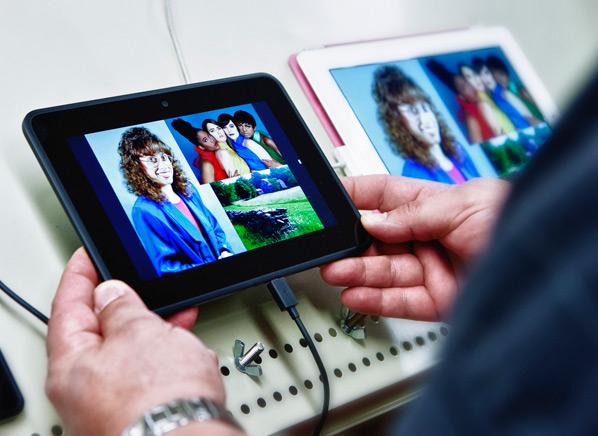
Battery life. In our tests, the Fire HD ran for more than 8 hours on a charge, making it one of the longest-running 7-inch tablets. True, the figure falls short of Amazon's 11-hour figure. But it's not uncommon for tablets to get shorter run times in our tough tests of repeated display of Web pages, than in the varied (and varying) manufacturers' tests.
Cloud access is wider. Like the previous Kindle Fire, the Fire HD lets you toggle between music and documents stored on the device and in your Amazon Cloud account, and to readily transfer Cloud content to the device. Now the same functionality is offered for photos—a handy upgrade, especially when that 5GB of free Cloud storage can hold some 2,000 photos. You'll also be able to import photos from the Fire HD's Facebook app to the device's photo gallery.
Handy hardware and software additions. Some oft-lamented omissions from the first-generation Fire have been remedied. The Fire HD has a physical volume button, replacing the virtual screen control on its predecessor. The device now has a camera, too, a front-facing one that can be used with the Fire HD's new Skype app.
New parental controls, known as FreeTime, allow you to control not only the times of days your kids are using the computer but the total number of hours of use per day, and by content type.
Watch our video to see the so-called X-Ray for movies feature that provides a cinematic counterpart to the X-Ray feature for Kindle Books.
Amazon's Whispersync feature, which now syncs e-book reading across platforms, has been expanded to sync listening on an audiobook with reading on a Kindle Book. It also syncs games, so you can pick up play on one device where you left off on another.
Sound is superb. The Fire HD is one of the first tablets to have Dolby Digital Plus audio enhancement. With the Digital Plus turned on, the sound from the Fire HD's stereo speakers was the best we've heard from a 7-inch tablet, including surprisingly distinct stereo separation for speakers that are only a few inches apart.
QUIBBLES
We've found no major flaws with the Kindle Fire HD, at least as yet. But these are some issues to consider:
There's still no full apps store. The selection of apps for the Kindle Fire line, including the HD, remains curated; apps are selected for optimal performance on the devices, according to Amazon. So you won't enjoy as many app choices as with other Android tablets or the iPad, with their access to full apps stores.
Storage is bigger but still limited. Where the first-generation Kindle Fire was available only with 8GB of storage, the Kindle Fire HD has been upgraded to 16GB or 32GB. Yet as with some other tablets, including the iPad, the HD has no memory-card slot to further expand storage.
Some easy-to-miss curveballs. The Kindle Fire HD ships without a charger, which appears as a $9.99 optional extra on the ordering page (or a $19.99 accessory when ordered separately). While you can use the supplied mini-USB cord to trickle-charge the tablet from a USB port, or possibly use another mini-USB charger you already own, we find shipping a tablet without a charger to be annoying.
Also, the advertised pricing for the Fire HD is for Special Offers versions that carry ads on the screen saver and Amazon offers along the bottom of the home page, in small type. After some internal confusion, Amazon has now confirmed that ad-free versions of the Fire HDs will be available, for a $15 additional charge, or you can pay the same fee later to remove the ads.
Finally, if you buy one of the 4G versions of the Fire HD (available on November 20), Amazon has announced a tantalizingly inexpensive data plan: $49.99 for a year of 250MB-per-month data access from AT&T, 20GB of Amazon Cloud storage, and a $10 Amazon Appstore credit. But after that first year, you'll need to sign up for regular AT&T data service, which costs $15 a month for 250GB and requires a contract.
CR'S TAKE
While our tests continue, the Kindle Fire HD shows every sign of being a very worthy tablet. It's also attractively priced (despite our quibbles), costing less, for example, than a 16GB Google Nexus 7, even if you add the cost of a charger and the no-Special-Offers upgrade.
The Fire HD's suitability for you over other tablets may hinge on your commitment to using the Amazon "ecosystem" of products and services. It will appeal the most to Amazon Prime subscribers who receive the service's free streaming movies and free Kindle Book loans, enjoy often-alluring Amazon special offers, and want easy access to personal content they've uploaded to Amazon Cloud.
—Paul Reynolds


 Build & Buy Car Buying Service
Save thousands off MSRP with upfront dealer pricing information and a transparent car buying experience.
 Get Ratings on the go and compare
while you shop


